What Is Cloud Computing? A Plain-English Guide for Business Owners

"We don't really use the cloud."
I hear some version of that sentence a lot, usually from a business owner sitting across from me with WhatsApp Business open on one phone, Gmail on the other, a GPay soundbox chirping on the counter and a Google Business Profile that brings in half their walk-ins. Every one of those runs on the cloud. Their customer list, their chats, their payments and their reviews already live on somebody else's computers, in buildings they will never see.
That isn't a criticism. The word "cloud" is genuinely unhelpful. It sounds vague and slightly magical, as if your files float somewhere overhead, and it's been stuck onto so many products that it barely means anything in an advert anymore.
So this guide does one job: it explains what cloud computing actually is, in plain language, and then gets practical. What the different types are, who the big providers are, what it really costs, how safe it is, what goes wrong, and what any of it means if you run a business and you're deciding how your website, app or internal software should be built.
I've been building software for businesses since 2018, much of it running on cloud infrastructure, including a multi-tenant SaaS platform that serves many shops from one system. I'll tell you what I'd tell a client, including the parts the cloud providers' marketing leaves out.
Prefer to watch first?
I made a three-minute video that covers the core idea, including the pizza analogy we'll come back to below. If you're a visual learner, start here and then read on for the detail the video doesn't have time for.
Cloud computing in one sentence
Here's the definition I use with clients:
Cloud computing means renting computing power, storage and software over the internet, from someone who runs the hardware for you, and paying only for what you use.
That's it. Everything else is detail.
Instead of buying a server, putting it in a cupboard in your office, keeping it cool, patching it, backing it up and replacing it when the hard drive fails, you use a slice of a much bigger machine in a professional data centre. You reach it over the internet. You can ask for more when you need it and give it back when you don't, usually within minutes, and the bill follows your usage, much like electricity.
The electricity comparison is worth holding onto. A century ago, factories ran their own generators. Then the grid arrived, and nobody sensible kept a generator unless they had a very specific reason. Cloud computing did the same thing to servers. Most businesses no longer need to own one, in the same way they don't need to own a power station.
So where is "the cloud", physically?
On the ground. Usually in a large, windowless, heavily guarded building full of server racks, with industrial cooling, backup generators, redundant fibre connections and security staff. There are thousands of these buildings around the world, and the big providers group them into regions (a geographic area, like Mumbai) and availability zones (separate data centres within a region, far enough apart that a fire or power failure in one shouldn't take down the others).
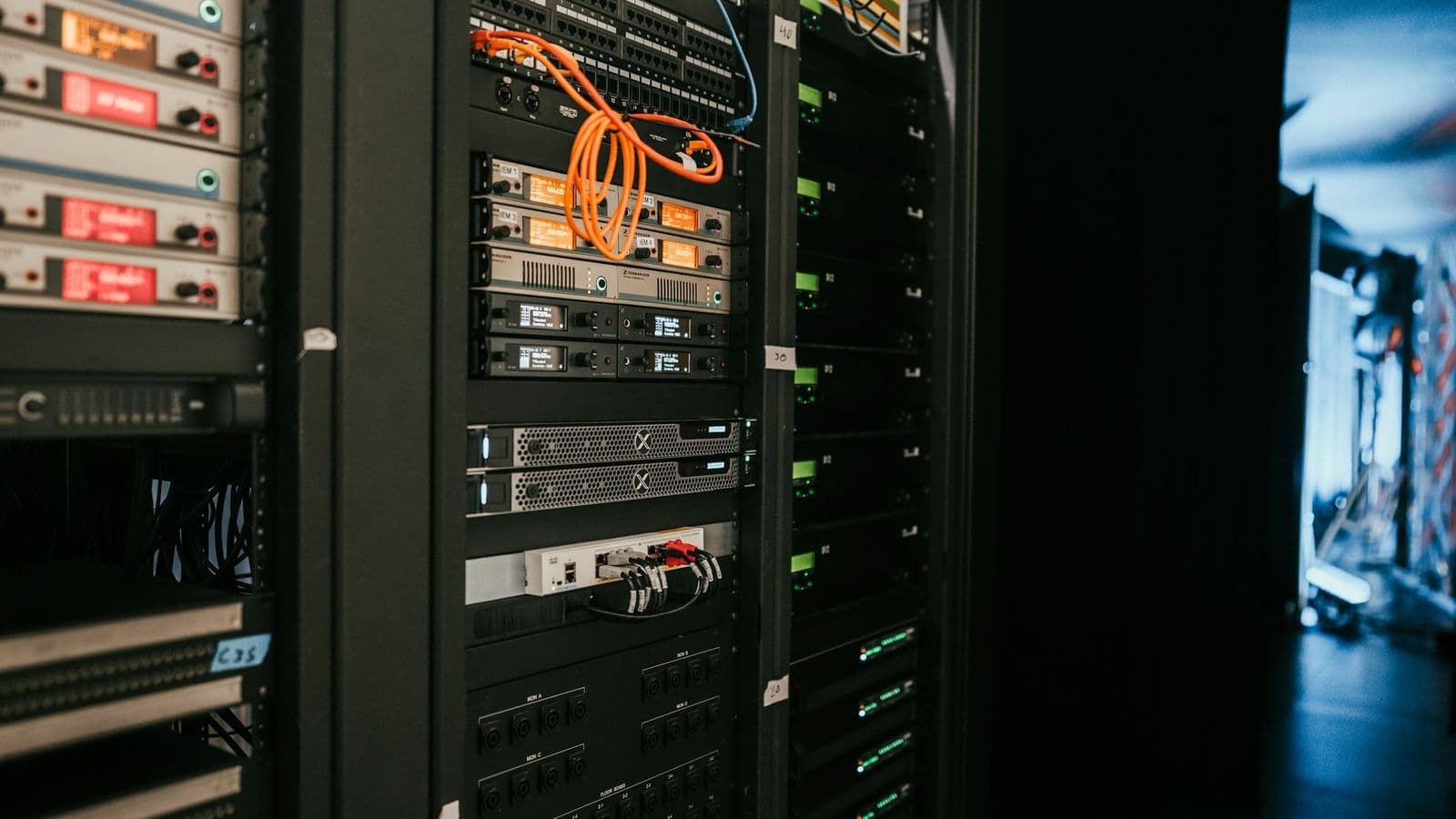 Tall black server racks in a data centre, packed with networking equipment and patched with bright orange cables, a blue-lit aisle running off to one side. Every photo, chat and order stored "in the cloud" sits on machines like these
There's an old joke among developers: "There is no cloud. It's just someone else's computer." It's half true, and the half that's true is useful. Your data isn't in the sky. It's on a physical disk, in a physical building, owned by a real company, governed by the laws of the country it sits in.
The half that's missing is what makes cloud computing more than renting a computer. The real trick is software. Providers use a technique called virtualisation to split one powerful physical server into many isolated virtual ones, and then wrap the whole operation in automation, so a customer can create a server, a database or a storage bucket with a few clicks or one line of code, and have it ready in seconds. No phone call, no purchase order, no technician.
The five things that make it "cloud"
In 2011, the US National Institute of Standards and Technology (NIST) published a definition that the industry still leans on. Strip out the formal wording and it says something is cloud computing when it has these five traits:
- Self-service. You can get resources yourself, on demand, without waiting for a human at the provider.
- Access over the network. You reach it over the internet from ordinary devices: a laptop, a phone, another server.
- Shared, pooled resources. The provider serves many customers from the same giant pool of hardware, and you generally don't know or care which exact machine you're on.
- Rapid elasticity. You can scale up or down quickly, sometimes automatically, and it feels like there's no ceiling.
- Measured service. Usage is metered, and you pay for what you consume.
That list is a handy lie detector. A local company selling "cloud hosting" that requires you to email them and wait two days for a new server, with a fixed annual fee regardless of usage, is selling hosting. Perfectly fine hosting, maybe. But not really cloud.
How we got here, briefly
Before the cloud, a business that wanted to run software online had a few options, none of them great for a small company. You could buy your own servers and keep them in your office. You could rent rack space in a data centre and ship your hardware there. Or you could buy cheap shared hosting, where your website lived on a server alongside hundreds of others and you had very little control.
The big shift came in 2006, when Amazon, which had built enormous internal infrastructure to survive its own holiday shopping peaks, started renting it out. Amazon Web Services launched S3 for storage and EC2 for virtual servers that year. Microsoft and Google followed with their own platforms, and within a decade the default answer to "where should this run?" had flipped from "on a server we buy" to "in the cloud, unless there's a good reason not to."
That's why a two-person startup today can launch a product that serves customers on several continents, something that would have needed a serious hardware budget in 2005.
IaaS, PaaS and SaaS, explained with pizza
This is the part of cloud computing that trips people up, because the acronyms sound alike. They describe how much of the work the provider does for you versus how much you do yourself. The best explanation I know uses pizza, and it's the one I use in the video.
 A hand lifting a slice of vegetable pizza with stretching cheese, topped with peppers, onions and courgette, on parchment paper on a white wooden table. How much of this pizza you make yourself is a surprisingly good way to understand the cloud service models
Imagine four ways to have pizza for dinner:
- Make it at home from scratch. You buy the flour, make the dough, own the oven, pay for the gas, cook it, serve it and wash up. Total control, total responsibility. This is on-premises: your own servers, in your own building.
- Buy a ready-to-bake pizza. Someone else made the base and the toppings. You still need your own oven, kitchen and table. This is IaaS, Infrastructure as a Service: the provider gives you raw virtual servers, storage and networking. You install and manage the operating system, the software and the security updates yourself.
- Order delivery. The pizza arrives cooked. You just provide the table, the plates and the drinks. This is PaaS, Platform as a Service: the provider runs the servers, operating system and runtime, and you just bring your code and your data.
- Eat out at a restaurant. You show up and eat. Everything else is handled. This is SaaS, Software as a Service: finished software you use through a browser or app, like Gmail, Zoho, Canva or Shopify.
Here's the same idea as a table, showing who looks after what:
| Layer | On-premises | IaaS | PaaS | SaaS |
|---|---|---|---|---|
| Your data and users | You | You | You | You |
| The application | You | You | You | Provider |
| Runtime, frameworks | You | You | Provider | Provider |
| Operating system | You | You | Provider | Provider |
| Servers, storage, network | You | Provider | Provider | Provider |
| Building, power, cooling | You | Provider | Provider | Provider |
Notice the top row. Your data and your users are always your responsibility, no matter which model you pick. Even with SaaS, if you give your accountant's nephew an admin password and he reuses it everywhere, that's on you, not Google.
Real examples of each
- IaaS: Amazon EC2, Azure Virtual Machines, Google Compute Engine, DigitalOcean Droplets. You get a server and a blank slate.
- PaaS: Heroku, Google App Engine, Azure App Service, and modern platforms like Vercel. This website runs on Vercel: I push code, and the platform builds it, deploys it to servers around the world and handles the scaling. I never log into a server.
- SaaS: Gmail, Google Drive, Microsoft 365, Zoho Books, Canva, Shopify, WhatsApp Business.
There's also serverless (sometimes called Functions as a Service), which takes PaaS a step further: you upload small pieces of code that run only when something triggers them, like a form submission, and you pay per run. A contact form that gets fifty submissions a month costs close to nothing to run this way.
Which one do you actually use?
All of them, probably. Most businesses use plenty of SaaS for everyday work, and if they have custom software, it typically runs on PaaS or IaaS underneath. As a rule of thumb:
- If an off-the-shelf SaaS product does what you need, use it. Don't pay someone to build an email system.
- If your process is specific enough that SaaS products force you into awkward workarounds, that's when a custom web application on a PaaS starts to make sense. I wrote about where that line usually falls in signs your business needs custom software.
- IaaS is for teams who need fine control over the environment, or whose software has unusual requirements. It's powerful, but every server you manage is a server you have to patch.
Public, private, hybrid: where the cloud lives
The service models describe how much the provider does. The deployment models describe whose hardware it is and who shares it.
- Public cloud. Shared infrastructure from a provider like AWS, Azure or Google Cloud, available to anyone with a card. Your workloads are isolated from other customers by software, but the hardware pool is shared. This is what most people mean by "the cloud."
- Private cloud. Cloud-style infrastructure, with the self-service and automation, dedicated to one organisation. Either in its own data centre or hosted by a provider. Banks, governments and large hospitals often use this for sensitive systems.
- Hybrid cloud. A mix: some systems in a private environment or on-premises, others in the public cloud, connected so data can move between them. Very common in larger organisations moving gradually.
- Multi-cloud. Using more than one public provider at once, say AWS for one product and Google Cloud for analytics. Sometimes deliberate, often just the result of history.
For a small or mid-sized business, the honest answer is almost always public cloud, sensibly configured. Private cloud is expensive to run well and rarely justified below a certain size.
There's one case where I do recommend a hybrid approach to smaller businesses, and it's closer to home than you'd expect. I'll come back to it in the section on outages.
What actually happens when you tap "upload"
Abstract definitions only go so far. Let's follow one ordinary action through the cloud.
 A hand holding an Android phone showing an Instagram profile grid of photos, with denim jeans and a pavement in the background. Posting a photo is one of the most ordinary cloud computing tasks there is
You take a photo and post it to Instagram. In roughly a second or two:
- Your phone finds the nearest door. The app connects to the nearest edge server, often in the same country, rather than one in California. That's why it feels fast.
- The upload lands in object storage. Your photo is saved as a file in a massive storage system and automatically copied to several disks, usually in more than one building, so a single drive failure can't lose it.
- Small programs get triggered. The upload kicks off processing: resizing the photo for different screens, compressing it, scanning it for policy violations, generating a thumbnail.
- A database gets a new row. A record is created saying who posted what, when, with which caption, and who should see it.
- Copies spread to the edge. The resized images are cached on servers around the world (a content delivery network, or CDN), so your cousin in Dubai loads them from somewhere nearby rather than from the original data centre.
- Followers get notified. A notification service pushes alerts to the phones of people who follow you.
None of those steps involves Instagram's engineers doing anything by hand. It's all automated, and it all runs on rented, elastic infrastructure. The same pattern, at a much smaller scale, sits behind an online store order, a school fee receipt or a hospital appointment booking. If you're curious how this works at truly massive scale, I broke down how WhatsApp handles millions of messages, which is a great case study in what clever architecture can do with surprisingly little hardware.
Why businesses moved to the cloud (and why some regret parts of it)
The sales pitch for cloud computing has five parts. All five are real. Three of them come with fine print that the brochures tend to skip.
1. Scale when you need it
The classic example: a clothing store runs an Eid sale, sends a WhatsApp broadcast and suddenly gets twenty times its usual traffic for six hours. With a fixed server, the site either crashes or you paid all year for capacity you used for six hours. In the cloud, you can scale up for the spike and back down afterwards.
What the pitch leaves out is that scaling isn't automatic just because you're "on the cloud." The application has to be built to scale, and the auto-scaling has to be set up. Plenty of cloud-hosted websites still fall over on a busy day because they're a single small virtual server that nobody configured to grow.
2. Speed to launch
Need a database for a new project? Minutes, not weeks. Want to test an idea for a month and throw it away? No hardware to sell afterwards. This is the benefit I personally value most. It's why a solo developer or a small team can build things today that used to need an IT department.
3. Paying for use, not ownership
Instead of a big upfront hardware purchase (capital expenditure), you pay a monthly bill based on usage (operating expenditure). For a new business, that's often the difference between starting and not starting.
But the cloud is not automatically cheaper. For steady, predictable workloads running all day, every day, renting can end up costing more over several years than owning, which is why some large companies have publicly moved certain systems back to their own hardware. For most small businesses, though, the maths still favours the cloud, mainly because the hidden cost of owning a server is the person who has to look after it.
4. Reliability and backups
Good cloud providers replicate data across multiple disks and buildings and have engineers on call around the clock. A properly set-up cloud system is far more resilient than a PC under the reception desk.
"Properly set up" is doing a lot of work in that sentence, though. The provider keeps the infrastructure running. Whether your database has backups, whether those backups are tested, and whether you can actually restore from them is usually your job. I've seen businesses assume "it's on the cloud, so it's backed up" and discover otherwise at the worst possible moment.
5. Global reach, close to your customers
The big providers run regions all over the world, and India is well covered now. AWS has regions in Mumbai and Hyderabad, Microsoft Azure has regions in Pune, Chennai and Mumbai, and Google Cloud has Mumbai and Delhi. For a business in Kashmir, that means your servers can be a few hundred to a couple of thousand kilometres away instead of on another continent, which matters for speed. It can also matter for regulation: India's Digital Personal Data Protection Act, 2023 has made more businesses ask where their customers' personal data is stored and who can access it, and an Indian region makes that conversation simpler.
 The Earth seen from space at night, with the city lights of Europe glowing against the dark planet and a thin bright ring of atmosphere around its edge. Cloud providers run data centre regions across the globe so users can be served from somewhere nearby
Distance genuinely affects how fast a site feels. If you've ever wondered why your website loads slowly for customers even though it seems fine to you, server location is one of the usual suspects, along with the others in my guide to why websites are slow.
AWS, Azure, Google Cloud and the rest
Three companies dominate the public cloud:
- Amazon Web Services (AWS). The first mover and still the largest. It has an enormous catalogue, with hundreds of services, and it's often the default choice for startups and for businesses that want the widest range of options.
- Microsoft Azure. Strong with companies that already live in the Microsoft world: Windows Server, Active Directory, Office 365, .NET. Big in enterprise and government.
- Google Cloud. Known for data, analytics and machine learning tools, Kubernetes (which Google originally created) and a clean developer experience.
Below them there's a healthy second tier: DigitalOcean, Linode (now Akamai), Hetzner and others offer simpler, often cheaper virtual servers, which can be a great fit for small projects. And then there are developer platforms built on top of the big clouds, like Vercel, Netlify, Supabase and Firebase, which trade some flexibility for being much easier to use.
Which should a small business pick?
Honestly, for most small and mid-sized businesses, the choice of provider matters less than people think. All three majors are reliable, secure and available in India. What matters far more is:
- Who's going to manage it. A cheaper provider you understand beats a fancier one nobody on your team can operate.
- How the software is built. A well-architected application runs well almost anywhere. A badly built one is slow and expensive everywhere.
- Avoiding unnecessary lock-in. Every provider has proprietary services that are convenient but hard to leave. Use them where they genuinely save time, and keep the core of your system portable where you reasonably can.
When I architect a system for a client, I start with what the software needs to do and how much traffic and data it realistically handles, then pick the simplest hosting that fits, rather than starting from a favourite provider and making the project fit around it.
Common myths about the cloud
A few beliefs come up again and again in client conversations. Some make people too nervous about the cloud, others make them too relaxed.
"It's in the sky / it's everywhere." No. It's in specific data centres in specific countries. That's why "which region?" is a real question with real consequences for speed and for law.
"The cloud is always cheaper." Not always. It's usually cheaper to start, and usually cheaper for small and variable workloads. It can become more expensive than owning for big, steady workloads, and it can get very expensive very quickly if nobody's watching the bill.
"If it's on the cloud, it's backed up." Your provider protects against their failures. They do not protect you against you: an accidental deletion, a bad update, a staff member who leaves on bad terms, ransomware on a connected laptop. You need your own backups and a tested restore process.
"The cloud is only for big companies." It's the other way around. Big companies can afford their own data centres. The cloud is what lets small businesses use the same class of infrastructure for a monthly fee.
"My data is safer on my own computer." Usually not. The average office PC has no encryption, no off-site backup, an outdated operating system and a password stuck to the monitor. A major cloud provider has physical security, encryption, and teams who do nothing but security. The real risk in the cloud isn't the provider. It's misconfiguration, which brings us to security.
Is the cloud actually secure?
Yes, with an important condition: the provider secures the cloud, and you secure what you put in it. The industry name for this is the shared responsibility model, and understanding it clears up most of the confusion.
 A silver combination padlock with two keys on its ring resting on a white computer keyboard on a wooden desk. Cloud providers secure the infrastructure, but the keys to your own accounts and data are still yours to look after
The provider is responsible for: the physical buildings, the hardware, the network, the virtualisation layer, and keeping one customer's systems isolated from another's. They're very good at this. Breaches of the underlying infrastructure of the major providers are extremely rare.
You are responsible for: who has access to your accounts, how strong those passwords are, whether two-factor authentication is on, whether your storage is accidentally set to public, whether your software is kept up to date, and whether sensitive data is encrypted.
When you read about a "cloud data leak" in the news, it's almost never a provider being hacked. It's usually a storage bucket left publicly readable, a database exposed to the internet without a password, an API key committed to a public code repository, or an admin account without two-factor authentication. Human configuration mistakes, in other words.
A practical security checklist
If your business uses cloud services, which it almost certainly does, these are the things I'd check first:
- Turn on two-factor authentication for every admin account: Google Workspace, Microsoft 365, your hosting provider, your domain registrar, your payment gateway.
- Use separate accounts for separate people. No shared "office@" login that six people know the password to. When someone leaves, you remove one account.
- Give people the access they need, not more. The person who uploads products doesn't need billing access.
- Keep secrets out of code. API keys and database passwords belong in environment variables or a secrets manager, never in the codebase.
- Have backups you control, in a separate account or location, and actually test restoring one.
- Set billing alerts. Not strictly security, but a sudden spike in your cloud bill is sometimes the first sign that an account has been compromised and is being used to mine cryptocurrency.
When I build custom software for clients, these aren't optional extras. They're part of the default setup, because a system that's secure only if the client remembers to do six things later isn't really secure.
What the cloud actually costs
This is where cloud computing surprises people, in both directions.
For a lot of small business needs, cloud costs are genuinely low. A well-built business website on a modern platform can cost very little to host. Many SaaS tools have free tiers. A small custom application with a database might cost about as much per month as a decent mobile phone plan. If you want a sense of what building a website itself costs locally, I've broken that down in how much a website costs in Kashmir in 2026.
But cloud bills can also run away, and it's usually for one of these reasons:
- Things left running. A test server someone spun up eight months ago and forgot. A database sized for a launch that never needed it. Cloud providers bill you happily for resources you aren't using.
- Over-provisioning out of fear. Picking the biggest server "just in case," when the application would run comfortably on a quarter of it.
- Data transfer fees. Uploading data into most clouds is free, but sending it out (called egress) is often charged. Serving large videos or files to lots of users from the wrong service can quietly become the biggest line on the bill.
- Managed services stacking up. Each managed database, queue, cache and monitoring tool is reasonably priced on its own. Twelve of them, on a small app, is not.
- No one owning the bill. The most common cause of all. If no one reviews it monthly, costs only ever go up.
The fix isn't avoiding the cloud. It's architecture and attention: right-sizing resources, using a CDN for heavy files, choosing simpler platforms when they're good enough, and setting budgets with alerts. A system designed with cost in mind from the start is far cheaper than one optimised in a panic after a scary invoice.
When the cloud goes down (and why that matters in Kashmir)
The cloud is reliable, not invincible. In October 2025, a fault in one AWS region in Northern Virginia disrupted a long list of well-known apps and websites for hours. Every major provider has had incidents like this, and they will happen again. Designing for failure, with backups in a second location and the ability to recover elsewhere, is part of doing cloud properly for anything business-critical.
But for businesses here, the bigger risk usually isn't the data centre. It's the connection to it.
Anyone who ran a business in Kashmir through 2019 and 2020 remembers what it was like when mobile internet disappeared for months. Even on ordinary days, connectivity in some areas is patchy, a fibre line gets cut during roadwork, or the shop's broadband goes down at the exact moment a queue forms at the counter. If your billing system is purely cloud-based and stops working the moment the internet does, the cloud's 99.99% uptime doesn't help you at all.
This is the hybrid case I mentioned earlier, and it shaped how I built Kapda Stock, a multi-tenant SaaS platform for textile and clothing shops. Its point-of-sale works offline: the counter keeps billing when the connection drops, and everything syncs back to the cloud when it returns. And alongside the managed cloud edition, there's an on-premise licence for shops that want everything on their own hardware. Neither choice is "right" for everyone. The point is that the architecture should fit how the business actually operates, not how a provider's brochure assumes it does.
So if you're planning software for your business, ask your developer two questions early: what happens when the internet goes down at our end? and what happens if the cloud provider has a bad day? A good developer will have answers to both. If the answer is a shrug, that tells you something.
What cloud computing means for your business
Bringing this back down to earth, here's how I'd translate all of the above into decisions for a typical small or mid-sized business.
If your business runs on spreadsheets and paper registers, the cloud's biggest gift is a single source of truth that everyone can reach. A stock register that lives on one PC dies with that PC. A cloud-based system, whether a good SaaS tool or custom software, can be reached from the shop, the warehouse and your phone, with history and backups. That was the idea behind the GOC inventory management system I built: replacing manual tracking with a centralised system that keeps operational data in the cloud.
If you have a website, it should be on modern hosting with a CDN, in or near India, with HTTPS and automatic backups. Old shared hosting that you haven't thought about in five years is often the weakest link in a business's online presence. A modern web application on a good platform is faster, safer and usually not more expensive to run.
If you're planning an app or a platform, the cloud is almost certainly where its backend will live. The questions that matter are the architecture ones: how it scales, how data is separated between customers, what it costs at 10 users and at 10,000, and what happens offline. These are cheaper to get right on paper than to fix in production. The same goes for mobile apps, which almost always depend on a cloud backend for accounts, data and notifications.
If you're interested in AI, you're already in cloud territory. Nearly all practical AI features, like chat assistants, document processing and smart search, call models running in large cloud data centres. Building them well is mostly about connecting those services safely to your own data and processes, which is what my AI and automation work is about. If you're wondering what that looks like day to day, AI agents for business is a good next read.
And if you're unsure whether to build or buy, start with off-the-shelf SaaS wherever it fits. Build custom only where your process is your advantage, or where SaaS products are costing you more in workarounds than a custom build would. I compared the options honestly in custom build vs WordPress vs no-code.
How I approach cloud architecture for clients
When a business comes to me for software, the cloud part is rarely what they ask about. They ask for an inventory system, an online store, a booking app or a school management portal. But the cloud decisions underneath decide how fast it feels, how much it costs every month, how safely it stores data and how it copes when things go wrong.
 A MacBook on a white desk showing lines of code in a dark editor, next to a coffee cup, a smartphone, a small potted plant and a larger monitor behind. Good cloud architecture is decided at a desk like this, long before the first customer signs in
My approach is fairly simple to describe:
- Start from the business, not the provider. How many users, how much data, how sensitive, how predictable the traffic, how reliable the local internet is. Those answers pick the architecture.
- Choose the simplest thing that will hold up. Managed platforms over self-managed servers wherever possible, because every server you don't run is one you don't have to patch at 2 a.m.
- Build security and backups in by default. Two-factor authentication, least-privilege access, secrets out of code, and backups that get tested.
- Design for the real world. Offline-capable where connectivity is a risk, Indian regions where data location matters, and a clear exit path so you're never trapped with one vendor.
- Keep the bill predictable. Sensible sizing, budget alerts, and a plain explanation of what you'll pay as you grow.
You can see the kinds of systems I build in my portfolio and in longer write-ups in the case studies, including how Kapda Stock gives every client business its own isolated database schema within one platform.
If you're moving a business off spreadsheets, rebuilding an ageing system, or planning a new product and want the infrastructure decisions made properly from day one, tell me what you're working on. I'll give you a straight answer on what you need, and just as importantly, what you don't.
Frequently asked questions
What is cloud computing in simple terms?
Cloud computing is renting computing resources, like servers, storage, databases and software, over the internet from a provider who runs the hardware, and paying for what you use. Instead of owning and maintaining your own machines, you use theirs, and you can scale up or down whenever you need.
What are the three main types of cloud computing?
The three service models are IaaS (Infrastructure as a Service, where you rent raw servers and storage), PaaS (Platform as a Service, where you deploy your code and the provider runs everything underneath) and SaaS (Software as a Service, finished applications like Gmail or Shopify). The deployment models are public, private and hybrid cloud.
Is Google Drive cloud computing?
Yes. Google Drive is a SaaS cloud storage product. Your files live in Google's data centres, and you reach them over the internet from any device. Gmail, WhatsApp, Instagram, Netflix and most banking apps are all cloud services too.
What's the difference between cloud hosting and normal web hosting?
Traditional web hosting usually means a fixed plan on a single server, often shared with many other websites, with a fixed price and limited room to grow. Cloud hosting runs on pooled infrastructure that can scale resources up and down, often automatically, and bills based on usage. In practice the line has blurred, and some "cloud hosting" plans are traditional hosting with a new label.
Is it safe to store business data in the cloud?
With the major providers, the infrastructure is very secure, generally far more secure than an office computer. Most cloud security incidents come from customer mistakes: weak passwords, no two-factor authentication, or storage accidentally made public. If you configure access properly and keep your own backups, the cloud is a safe place for business data.
How much does cloud computing cost for a small business?
It varies widely with what you run. Many small businesses get a lot done on free or low-cost SaaS tiers, and a well-built website or small custom application can be hosted for a modest monthly amount. Costs rise with traffic, data and the number of managed services. The biggest overspending usually comes from forgotten resources and oversized servers rather than from genuine usage.
Which cloud provider is best in India?
AWS, Microsoft Azure and Google Cloud all have data centre regions in India and are all reliable choices. For most small businesses, the deciding factors are how the software is built, who will manage it and how much lock-in you're comfortable with, rather than which of the three you pick. Simpler providers and developer platforms are often a better fit for small projects.
What happens to cloud software when the internet goes down?
A purely online system stops working at your end until the connection returns, even though your data stays safe in the cloud. If connectivity is unreliable where you operate, software can be designed to work offline and sync later, or run partly on local hardware. It's worth raising with your developer before anything is built.
Can I move my existing software to the cloud?
Usually, yes. Some systems can be moved more or less as they are onto cloud servers, while others benefit from being partly rebuilt to take advantage of managed databases and scaling. An assessment of what you have, what it costs to run now and where it's struggling is the right first step.
The cloud is a tool, not a destination
Strip away the branding and cloud computing is a very practical idea: use professionally run, elastic infrastructure instead of owning your own, and pay for what you use. It's the reason a small business in Srinagar can run the same calibre of software as a company in Bengaluru or Dubai.
What it isn't is a guarantee. Software doesn't become fast, secure, reliable or affordable just because it runs in a data centre. That comes from the decisions made when it's designed and built.
If you'd like help making those decisions, whether that's moving off spreadsheets, building a custom system, or checking whether your current setup is costing more than it should, get a quote or send me a message. And if you found the video useful, there are more short explainers like it on the Build With Owais YouTube channel.
Owais Noor
Full-Stack Developer & Digital Marketer, based in Srinagar. I write about building fast, useful websites and software — and getting them found.